|
 Chitika is a premium pay-per-click (PPC) service. Their flagship product eMiniMalls is also called "Interactive Merchandise Kiosks", because of their versatility in showcasing the advertiser's products. It brings product promotion to life on the web. Provide your users with relevant content and comparative shopping information without even leaving your site! Chitika is a premium pay-per-click (PPC) service. Their flagship product eMiniMalls is also called "Interactive Merchandise Kiosks", because of their versatility in showcasing the advertiser's products. It brings product promotion to life on the web. Provide your users with relevant content and comparative shopping information without even leaving your site!
While their main focus is on blogs, Joomla is no exception. Now, the latest version of the Chitika eMiniMalls module for Joomla brings in simplicity into the field. It provides ALL features available on Chitika and more! You just have to use it to believe it.
What's more, this product is endorsed by Chitika! This has been featured on their "Developer's Blog".
Features
- All features available on Chitika eMiniMalls are included
- Some features that are not available with the default Chitika code generator are also included
- 100% compatible with Chitika Policies
- Very easy to use
Download the Chitika module here:

Installation
Installing this module is very easy. It is basically done as you would install any Joomla module.
First of all, please download the latest version from the download page. Save it on your computer at a convenient location, may be your desktop.
- Go to the admin backend of your Joomla website and login.
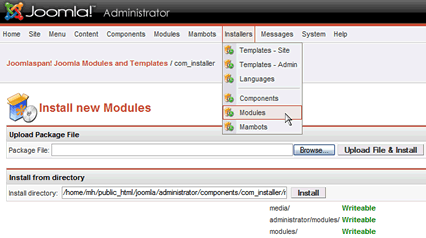
- Click on Installers > Modules in the top menu bar (see picture below).
- Click on Browse..., select the Chitika eMiniMalls Module that you saved on your computer.
- Click on Upload File & Install.
- If nothing is wrong with your setup/ installation file, your module will be installed!
- Now, the time is to configure it for your use :)
Have fun using this module... read on for more information about this module.
Make More Copies of this module
You may not be satisfied with only one ad block on your site, right? You will probably want to add more. Here's how:
Do not try to install it repeatedly as that is not possible and not necessary. Open the list of all modules in your Joomla admin backend. Check the box to the left of the Chitika module. Then go to the top of the page and click on the 'Copy' button on the right top. A copy of the module will be created and placed under the previous. It will read 'Copy of...'.
Now open that and change the parameters. All parameters can be configured afresh, including the position and size of ads.
SignUp with Chitika now and start making revenue from your website.

|
 Our Products


